
Need to sign a PDF without printing, signing by hand, scanning, and sending it back? Mainconverter PDF Signer lets you add an electronic signature directly to a PDF document from your browser.
You can upload a PDF, create your signature by drawing or typing, place it where you want it on the document, and download the signed PDF when you’re finished.
Try the Mainconverter PDF Signer: Sign PDF online with Mainconverter
PDF Signer
Upload a PDF, drop your signature onto the page, then download the signed file. Nothing leaves your browser.
If you need to combine multiple PDF files before signing, use the PDF Merger to bring them together into a single document. You can then upload the combined PDF to the PDF Signer and add your signature in the required location.
How to Sign a PDF Online
Our PDF Signer is designed to make signing PDF documents straightforward. You don’t need to print the document or install desktop PDF software.
Follow these steps to sign PDF files online.
1. Upload your PDF
Open the our PDF Signer and upload the PDF you want to sign.
You can click the upload area and select a PDF from your computer, or drag and drop the file into the upload area.
The tool then opens the document so you can view the PDF before adding your signature.
2. Click “Add signature”
Once your PDF is loaded, click Add signature.
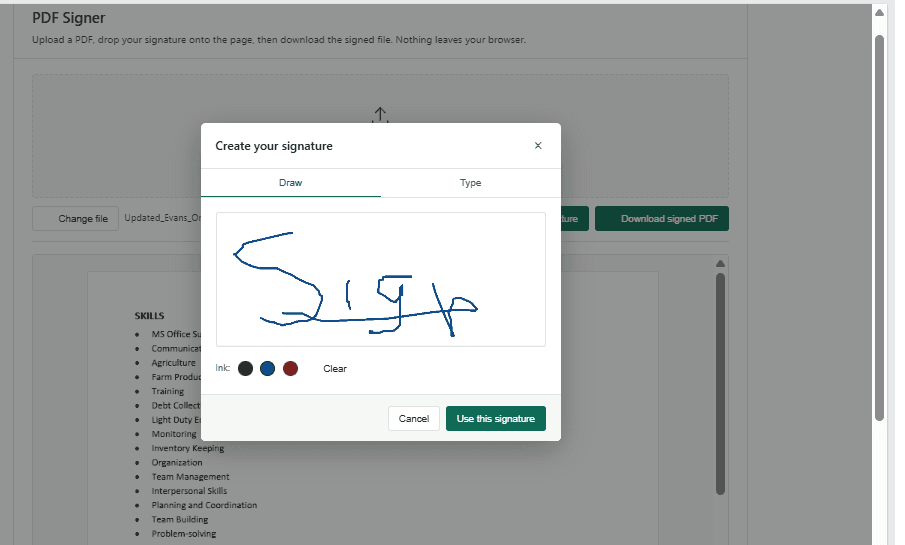
A signature window opens with two options:
- Draw — Draw your signature using your mouse, trackpad, touchscreen, or stylus.
- Type — Type your name and use it as your electronic signature.
Choose the option that is most convenient for you.
3. Create your signature
If you choose Draw, write your signature inside the signature box. You can clear it and draw again if you are not satisfied with the result.
If you prefer not to draw, select Type and enter your name.
This gives you flexibility when signing different types of documents. The ability to type or draw a signature is also common in PDF signing workflows.
4. Use the signature on your PDF
After creating your signature, click Use this signature.
Your signature will appear on the PDF as a movable element. Drag it to the location where you need to sign.
You can adjust its position until it looks right on the document.
5. Download the signed PDF
When you’re satisfied with the placement, click Download signed PDF.
Your completed PDF is then ready to save, share, email, or submit.
Sometimes you don’t need to sign the entire document. If the PDF contains multiple sections or pages and you only need a specific section, you can use the PDF Splitter to extract the pages you need before signing them. This can also make a large document easier to manage and share.
Note: Electronic signatures are commonly used to indicate approval or acceptance of documents. However, an electronic signature should not automatically be confused with a certificate-based digital signature. Certificate-based digital signatures use a digital ID to help authenticate the signer and protect document integrity.
For more information about the technical standards behind digital signatures, see the NIST Digital Signature Standard (FIPS 186-5).
NIST Digital Signature Standard (FIPS 186-5)
Frequently Asked Questions
What is a PDF signer?
A PDF Signer is a tool that allows you to add a signature to a PDF document electronically. Depending on the tool, you may be able to draw, type, or insert a signature and position it on the document.
How do I sign a PDF online?
Upload your PDF to Mainconverter’s PDF Signer, click Add signature, choose Draw or Type, create your signature, and drag it to the required location. Then click Download signed PDF.
Can I draw my signature on a PDF?
Yes. The PDF Signer lets you select Draw and create your signature in the signature box. You can then use the signature on the PDF and position it where required.
Can I type my signature on a PDF?
Yes. Select the Type option when creating your signature. This allows you to enter your name instead of drawing it manually.
Do I need Adobe Acrobat to sign a PDF?
No. Adobe Acrobat is one option for signing PDFs, but it is not the only way to add an electronic signature. An online PDF signer can provide a simpler workflow when you only need to add an electronic signature.
Is an electronic signature the same as a digital signature?
Not necessarily. In general usage, the terms are often used interchangeably, but a certificate-based digital signature uses a digital ID and cryptographic verification.
Remember to bookmark this page for future PDF signing needs.